- TOP
- Kukai
Digitize paper and PDFs at high speed with high accuracy,
and let AI handle the understanding and organization automatically.
Three reasons people choose Kukai
- Easy - Drag & drop and ingestion is done
- Fast - AI understands and emits JSON in as little as 30 seconds
- Strong - Template-driven, so new forms are supported immediately
Feature highlights
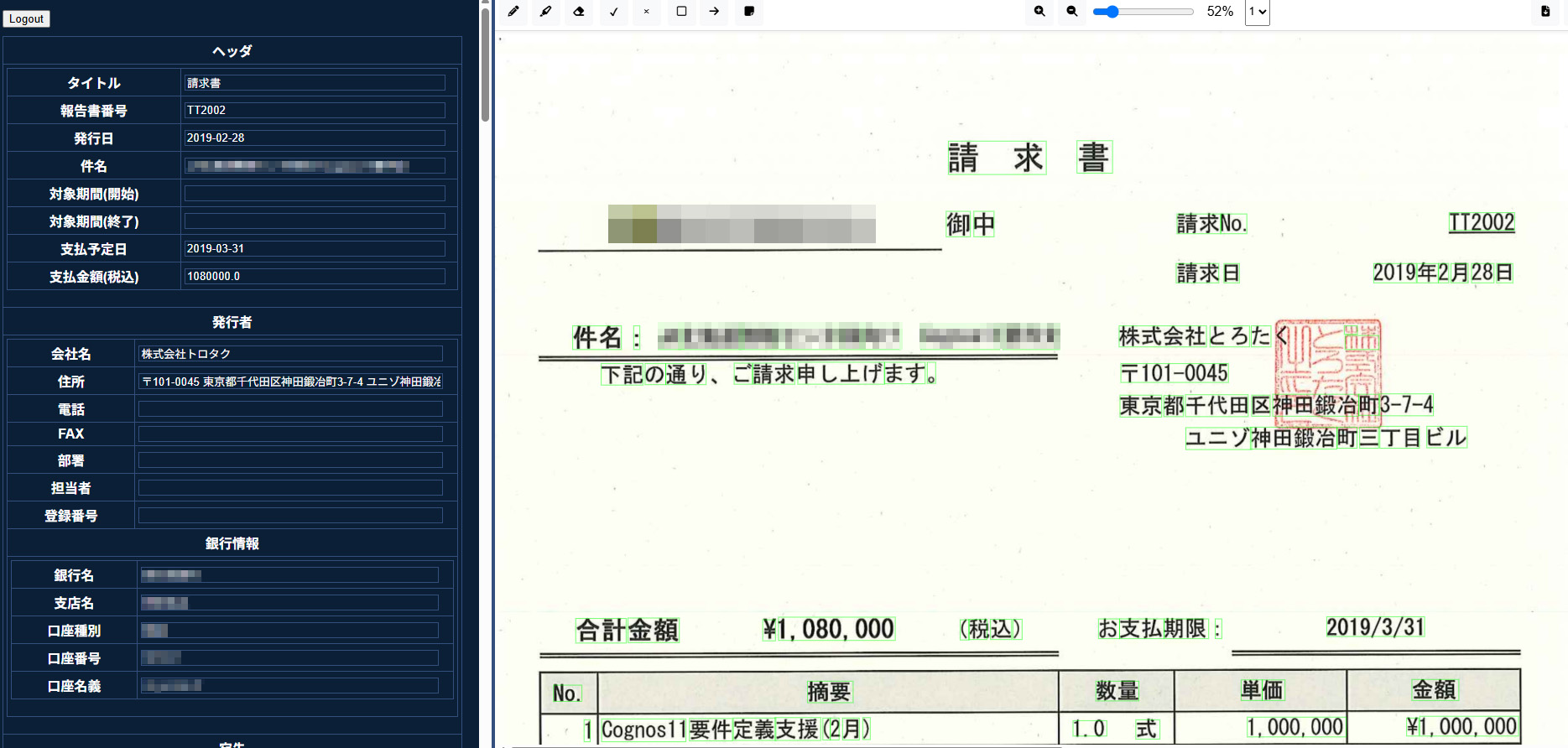
- High-precision OCR - Faded characters and handwriting alike, captured cleanly.
- AI understanding & organization - Reading, reasoning, summarizing - all handled by AI.
- REST API - Sync with your core systems instantly.
- Sync & async processing - One page or ten thousand, the speed is the same.
- Custom JSON - Just the fields you want, exactly how you want them.
System overview
This system extracts text from PDFs such as invoices and emits it as well-organized JSON. By combining OCR via Google Cloud Vision with OpenAI's Chat API, the contents of a document are structured automatically. The browser interface also provides an editable report screen.
Technology stack
- Python 3 / FastAPI - Server application[^1]
- Google Cloud Vision API - Extracts text from PDF images[^2]
- OpenAI API - Analyzes the extracted text and produces invoice data[^2]
- pdf2image / OpenCV / PyMuPDF - Converts PDFs to images and prepares them for OCR[^2]
- Jinja2 - Renders reports as HTML templates[^3]
- JavaScript - Browser-side highlights, zoom, and other interactions[^4]
System architecture
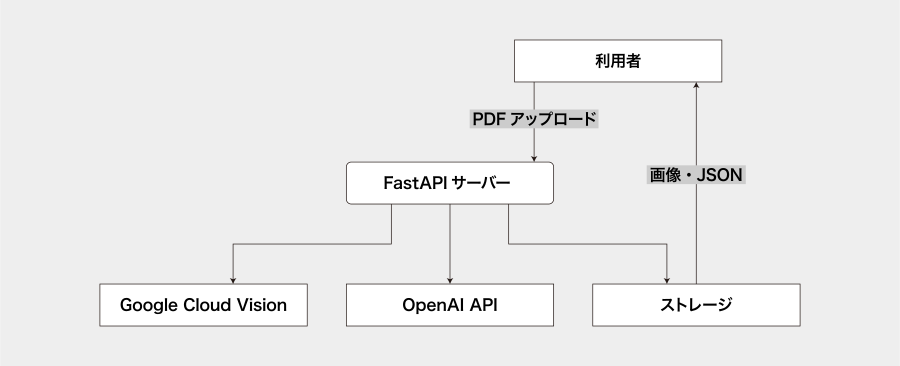
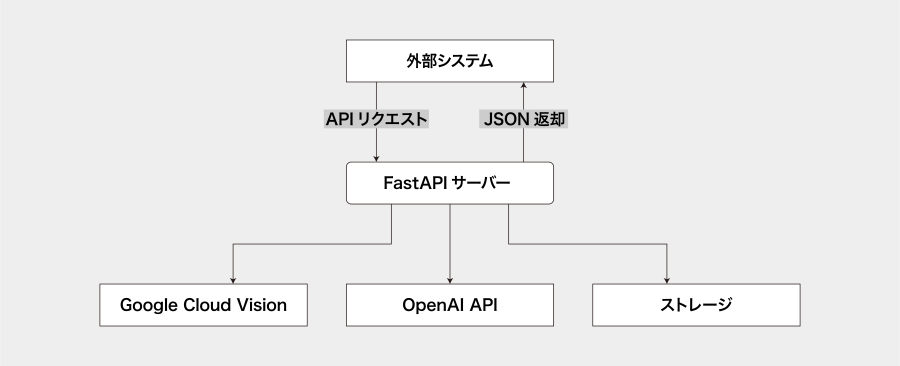
Data flow
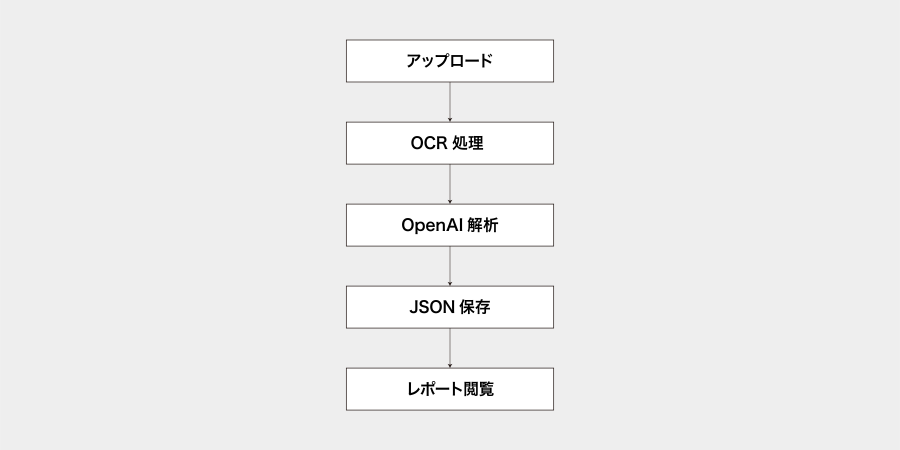
- 1. PDF upload
- Accepted at the /upload endpoint. PDFs are saved to a storage/{timestamp} directory[^5].
- 2. OCR processing
- process_file rasterizes the PDF (300dpi) and the Vision API extracts text and positional information[^6][^7].
- 3. AI analysis
- The OCR result is sent to OpenAI together with a prompt to produce invoice JSON[^8][^9].
- OCR results come in two forms: a JSON form with coordinate information, and a plain-text form.
- Schema mapping is delegated to OpenAI.
- For the plain-text form, downstream code can apply hard-coded post-processing.
- 4. Save results
- The generated JSON, OCR result, and page images are saved to the same directory[^10].
- 5. Report display
- /report/{id} renders an HTML report. The edit form and OCR image are shown side by side[^11] [^12].
- 6. API usage
- /v1/invoices:analyze returns JSON immediately when a PDF is posted[^13].
An async version /v1/invoices:analyzeAsync is also available[^14].
- /v1/invoices:analyze returns JSON immediately when a PDF is posted[^13].
FAQ
- Q. Is it secure?
- A. All traffic is encrypted with TLS 1.3. Data can be stored within the Japan region.
- Q. Can it read handwritten slips?
- A. Yes - we use Google Cloud Vision's high-end model, which is highly accurate even on handwriting.
- Q. I want to customize fields to fit our workflow.
- A. Edit the JSON schema visually from the admin screen, with changes applied immediately.